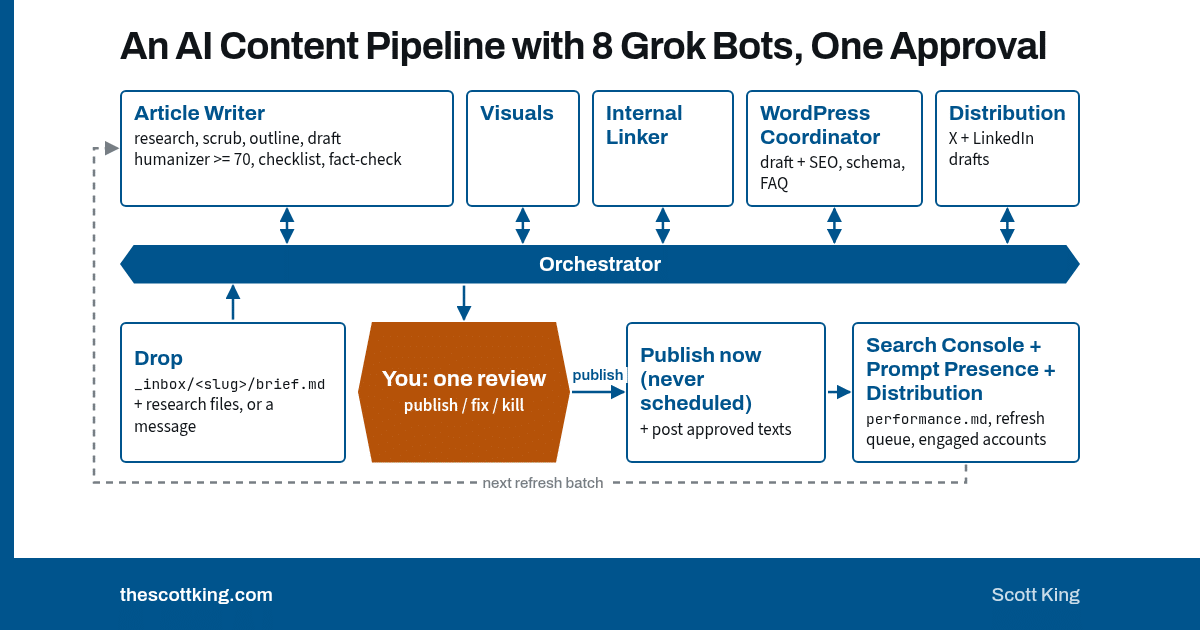
grok-content-pipeline is a public GitHub repo that sets up 8 Grok Bots as a content pipeline for a WordPress site. You drop in a topic or your research, the bots outline, draft, score, fact-check and build the WordPress draft and social posts, and you approve once before anything goes live.
I built it because an AI pipeline with no checks publishes whatever the model writes. A wrong number goes live with my name on it. This pipeline stops itself when a claim fails, writes down why, and waits for me.
Why does an AI content pipeline need gates?
A pipeline without gates ships its mistakes. I learned that on my own site.
My article on choosing an AEO consultant merged two Gartner stats into one. The fix went in, but that piece’s full fact-check was only logged after it went live. That gap is why version 1.1 makes the fact-check a gate before any WordPress draft.
I call the failure mode the publish-whatever pipeline. It looks fast because nothing stops it. Then a reader finds the merged stat, and the speed costs you the trust you were writing for.
The fix is a hard stop. In this pipeline, a failed gate writes a file called HOLD.md with the reason and your options. Nothing downstream runs. You’re told once, and your answer resumes the run from that gate.
What does the grok-content-pipeline repo do?
The repo gives you 8 bots, the process they follow, and the files they write. Each bot owns one job:
| Bot | What it does | Import |
|---|---|---|
| Pipeline Orchestrator | Runs every drop from intake to your one review | Template |
| Article Writer | Research, outline, draft, humanizer and fact-check gates | Template |
| Visuals Studio | Featured, X and LinkedIn images and charts | Template |
| Internal Linker | Links in and out of each new article | Template |
| WordPress Coordinator | Builds and verifies the draft, publishes on approval | Template |
| Distribution | X and LinkedIn posts in your voice | Template |
| Search Console | Per-post search readback and weekly refresh list | Template |
| Prompt Presence Runner | 30-day AI-answer citation check | Template |
Two rules keep the bots from stepping on each other. Only the Orchestrator decides what runs next. Only the WordPress Coordinator edits the CMS, and it edits block by block. It never replaces a whole post body.
The other bots stay in their lane. The Internal Linker reads your site through its public REST API and never logs in. Visuals Studio draws charts only from the research data file. Distribution lists the public accounts that engaged with a post, and it does no outreach.
What are the gates, and what happens when one fails?
Each gate has a pass condition and a fail action. Every gate writes one line to gates.md and one row to time-log.md.
- G0 Intake. A topic is present, the slug is unused, and the CTA is known. Fail: HOLD.
- Research. Every number has a URL or file and a date. Fewer than 3 sourced findings: HOLD.
- G1 Scrub. No client names, people or figures remain unless the brief marks them public. Fail: HOLD.
- G2 Humanizer. The voice panel’s Humanizer score meets your minimum (default 70). The first score is logged before any change. Fail: up to 2 rewrites by default, then HOLD.
- G3 Checklist. The article answers first, meets the word floor (default 1,500), has a CTA, uses no banned phrases and follows your price rule. Fail: one auto-fix, then HOLD.
- G4 Fact-check. Every claim is opened and matched to its source, with 0 FAIL. Fail: rewrite to the source wording or cut, re-check once, then HOLD. No CMS draft without a PASS.
- Visuals and links. Charts come only from the data file, and links return HTTP 200. Fail: the chart or link is dropped and noted.
- G5 CMS verify. Title, meta, slug, featured image and alt text, schema, FAQ and CTA show on the preview. Fail: one retry, then HOLD.
- Social. The exact texts are saved as drafts. Fail: the review goes out without social, and that’s noted.
Nine gates stand between a topic and your one review
Each gate has a pass condition and a fail action. A gate that stops the run writes HOLD.md with the reason and your options, and nothing downstream runs until you answer.
- 1IntakePass: Topic present, slug free, CTA known or defaultFail: HOLD Stops the run
- 2ResearchPass: Every number has a URL or file and a dateFail: Under 3 sourced findings: HOLD Stops the run
- 3ScrubPass: No client names, people, figures or scrub terms left unless marked publicFail: HOLD Stops the run
- 4HumanizerPass: Humanizer score at least the minimum (default 70), first score loggedFail: Rewrite up to the max (default 2), then HOLD Stops the run
- 5ChecklistPass: Answer first, at least the word floor (default 1,500), a CTA, no banned phrases, price rule followedFail: One auto-fix, then HOLD Stops the run
- 6Fact-checkPass: Every claim opened and matched to its source, 0 FAILFail: Rewrite or cut, re-check once, then HOLD. No CMS draft without a PASS. Stops the run
- 7Visuals and linksPass: Charts only from the data file, links return HTTP 200Fail: Drop the chart or link and note it Run continues
- 8CMS verifyPass: Title, meta, slug, featured image and alt text, schema, FAQ and CTA show on the previewFail: One retry, then HOLD Stops the run
- 9SocialPass: Exact texts saved as draftsFail: Review goes out without social, noted Run continues
The fact-check gate comes before the CMS. No WordPress draft exists until every claim is matched to its source.
Source: grok-content-pipeline SOP.md, gate table (lines 79 to 87).
A hold doesn’t rot quietly. The Orchestrator flags any hold older than your stale limit, which defaults to 3 days.
Why one approval, and why no scheduled publishing?
You review once. When every gate passes, the Orchestrator sends you one message with the preview, images, scores, fact-check fixes, inbound links, exact social texts and the time spent so far.
You answer with one of four replies:
- publish: the post goes live now, gets a logged-out check and its inbound links, and the approved social texts post.
- publish, hold social: the post goes live and nothing posts.
- fix: …: the affected gates run again and a new review goes out.
- kill: nothing is published.
Publishing is always real time. The settings file says it plainly: scheduled publishing is not supported. A brief can carry a target date, but that date is a goal for the final review, never a publish time.
Your “publish” starts a chain: the live post, the logged-out check, the inbound links and the social posts. All of it runs right after your reply, while you’re still watching.
You can loosen the approval if you want more control or less. The modes are final_only (the default), outline_and_final, every_step and none. With none, the pipeline publishes on its own once every gate passes. The setup skill recommends against it, and so do I.
What has the pipeline produced so far?
RESULTS.md holds the only numbers I publish about the pipeline. Each one comes from a file in my own pipeline folder:
- About 2.5 hours from outline to live for a research pillar on Oct 30, 2026. That’s from status timestamps: outline done at 9:26 AM, live at 11:56 AM Central.
- 56 of 56 claims passed the fact-check on that same pillar.
- 29 minutes from handoff to a live, verified rewrite of my transcription cleanup article on Nov 3, 2026.
- Cited by Google AI Mode for 2 of 3 topic prompts for one article, checked logged out on Nov 2, 2026.
What is in the repo?
Everything a new owner needs sits in one folder:
README.md: the overview, the flow, the bot import links and the 6-step clone.SETUP-CHECKLIST.md: accounts, sign-ins, bot import order, skills, folders, routines and the dry run.settings.example.md: the one file for every owner-specific value.SOP.md: the full process, reading its values from settings.bots/: one brief per bot, with its role, instructions, skills, inputs, outputs, routines and access.skills/:content-pipeline-setupfor the first run,pipeline-voicefor the writing voice and humanizer gate, andpipeline-brandfor images and charts._templates/and_inbox/_TEMPLATE/brief.md: the blank article files and the drop-in brief.example-sample-article/: one real article folder from my site, with private details removed.RESULTS.mdandCHANGELOG.md: the proof and the version history.
The repo ships under the MIT License.
How do you set up the pipeline?
The checklist puts setup at about an hour plus the dry run. Here’s the order:
- Get the accounts ready. You need a Grok Bot workspace with a box, a WordPress site with an Editor or Administrator user for the bot, a public REST API, and a Search Console property. Add X and LinkedIn if you want social drafts.
- Sign in yourself. Log in to wp-admin, Search Console, X and LinkedIn in the box browser. The bots never see your passwords.
- Import the 8 bots. Use the template links in the table above. Start with the Orchestrator, because its first conversation runs setup.
- Copy the folders. Put the repo’s
_templates/,_inbox/andSOP.mdin your pipeline folder. - Run setup. Tell the Orchestrator “set up the content pipeline.” The
content-pipeline-setupskill asks for your values one question at a time and writessettings.md,voice.mdandbrand.md. - Approve the routines you want. The inbox watch is optional, because a message to the Orchestrator also starts a run. The Monday routines cover search readback, social readback and the AI-answer check.
- Run the dry run. A short test topic with three sourced findings, the research gate’s minimum, runs through every gate to a WordPress draft and social drafts. Nothing publishes. Reply “kill” when you’ve checked the logs.
- Drop your first real topic. Approve the review, then confirm the post is live, checked logged out, and the social texts posted or saved.
For the voice, give setup 3 to 5 pieces you actually wrote. The skill tells you to skip ghostwritten pieces and anything an AI already rewrote, because both poison the sample.
What goes in the drop-in brief?
The brief is one file, and only topic is required. Copy _inbox/_TEMPLATE/ to _inbox/<topic-slug>/, fill in brief.md, add your research files and set status: ready. The pipeline ignores drafts.
The optional fields let you steer:
format: article, case-study, posts, repurpose or refresh.angleandaudience: the claim to argue and who should act on it.cta: one CTA key from your settings, or blank for the best fit.research:provideduses your files,lighthas the writer research, anddeepcalls the optional Researcher bot.scrubandpublic_ok: names to remove and names already public.approval_mode: override the default for this one piece.
You can also skip the file and message the Orchestrator “new drop” with your files attached.
Which settings will you change first?
All of your values live in settings.md. These are the ones the README says you’ll probably change:
approval_mode: one review by default.social_on_approval:postsends the approved texts,draft_onlysaves them.voice_skill: the one voice every piece uses. The default ispipeline-voice.brand_skill: colors, type and image sizes. The default ispipeline-brand.humanizer_min,max_rewritesandword_floor: 70, 2 and 1,500 by default.
The settings file also holds your CTA pages, banned phrases, price rule and a list of past employers to mention only in the past tense.
What are the limits?
Know these before you clone it:
- This is for WordPress. If you use a different CMS, you will need to modify the template.
- Search Console needs a signed-in browser unless you have a connector.
- AI-answer checks need a logged-out browser. Perplexity often walls logged-out sessions, and a signed-in ChatGPT can’t be tested logged out. Every result says which engines ran.
- Not automated yet: video, newsletters, webinars and Telegram.
- One voice by design. Multiple author voices are out of scope.
How was this post made?
This post started as a drop-in brief in its own folder, with the repo as the research. The pipeline’s Article Writer wrote the outline, the search check, the draft, the humanizer score and the fact-check against the repo files. Those steps ran on Nov 17, 2026, from 4:25 PM to 4:30 PM Central, and time-log.md records each one. The visuals, links and WordPress draft come next, and I approve once before it goes live.
FAQ
What is an AI content pipeline?
It’s a set of AI steps that turns a topic or research into a published piece. This one uses 8 Grok Bots and stops at any failed gate.
Can I use it without WordPress?
It supports WordPress only today. If you use another CMS you will need to modify the WordPress template to work with your site.
Does it publish without my approval?
Not by default. The default mode sends you one review. Publishing happens only when you reply “publish,” and it’s always real time.
Do I need to write code?
No. You import the bots, copy the folders and answer the setup skill’s questions.
Where do I get it?
On GitHub at thescottking/grok-content-pipeline. The bot import links are in the README.
Get the grok-content-pipeline repo, star it, and run your first drop.

Scott King helps B2B technology companies build AI marketing systems and create differentiated content.